
As a creative freelancer, this is the Google Sheet I wish I had on Day 1
It’s been 10+ years, and it is still how I avoid a headache when it’s time to file my taxes.

Creative people hate keeping track of money. I was the same.
But if you don’t track your income, clients will take advantage of you. Because they also know creative people hate keeping track of money.
What do I mean by ‘keep track of your money’? At any given point of time you need to be able to answer these 5 questions easily:
How many paying jobs have I done this year?
How many of them actually paid me and when?
How much did they pay me?
How much went in tax deducted at source (TDS)?
How much money did I actually make?
A spreadsheet is the best way to keep track of this. I use Google Sheets. You can use anything that relies on columns and rows.
How to create one
Create a new file in Google Sheets. Fill in the first row with these headings in each cell.
Row A, Cell 1 - Invoice date.
B1 - Client legal name (this will be the name on the invoice)
C1 - Description of the job
D1 - Invoice number
E1 - Invoice Value
F1 - TDS deducted by client.
It’s usually 10%.
G1 - Received in the bank
H1 - Date received
Update this sheet regularly, starting with once every 3 months. (Block 15 minutes on the last Sunday of the 3rd month to do this.)
Trust me, once every three months is enough when you are just starting.
You don’t want to deal with the psychological devastation of staring at a sparse Google Sheet every month, especially when you thought it would be filled with 7-digit figures.
If you are good at what you do, you will graduate to a monthly schedule in four or five months. (Confession: it took me 2 years)
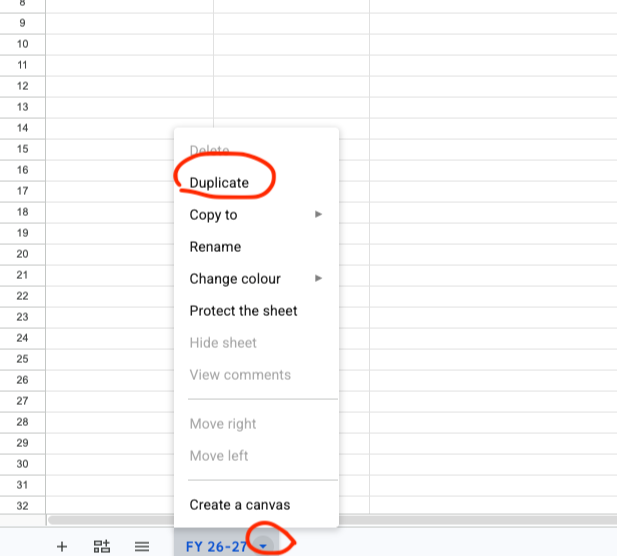
How to create a duplicate sheet in Google Sheets
To keep things organised, duplicate the sheet for each new year and rename it with the specific year (for example, 2024-25).
That way, you can easily tell if you are growing year on year as a business.
A simpler way to create one
If you don’t want to go through the trouble of making it, you can use this one here:
Simple accounting sheet for creative freelancers
Click on the link to open up Google Sheets. Once it loads, go to File > Make a copy to save your own version to your Google Drive.
Yes, I know there are multiple apps that promise to keep your books.
But when I was starting, I just found it all very tedious (see what I did there) and confusing.
This sheet is simple and made sure I had most of the answers my CA asked when it was time to file my taxes. For instance, this sheet helps me keep track of how much GST I have received from clients every month. A good thing to know when you are filing your GST returns.
Also, now that I have graduated to filling it up every month, it keeps me aware of how much I am actually making or not making.
As a creative freelancer, nothing is as cut and dry as rows of empty cells to help you decide between watching Netflix after lunch or working on your lead-generation ideas.
If you use the sheet and have feedback please share it with me in comments.